DG切换(含只读)和故障转移
(一)从主库切到物理备库
主库查看当前可切换状态
SQL> SELECT SWITCHOVER_STATUS FROM V$DATABASE;

SWITCHOVER_STATUS
--------------------
SESSIONS ACTIVE
主库查看当前活动的用户会话
SQL> select program,type from v$session where type='USER';

PROGRAM                                          TYPE
------------------------------------------------ ----------
oracle@xlong03 (J000)                            USER
sqlplus@xlong03 (TNS V1-V3)                      USER
此处需要停止所有的应用及job及活动会话,下边便是强制杀会话使其退出
--杀数据库会话
select 'host kill -9 '||
spid
from gv$session s,gv$process p
where s.paddr=p.addr and s.program like '%oracle@xlong03 (J000)%';
select 'alter system kill session '||''''||sid||','||serial#||''';'
from v$session
where program like '%oracle@xlong03 (J000)%';
主库查看当前活动的用户会话
SQL> select program,type from v$session where type='USER';

PROGRAM                                          TYPE
------------------------------------------------ ----------
sqlplus@xlong03 (TNS V1-V3)                      USER
主库查看当前可切换状态
SQL> SELECT SWITCHOVER_STATUS FROM V$DATABASE;

SWITCHOVER_STATUS
--------------------
NOT ALLOWED
主库查看dg当前的报错信息
set lines 132
col message for a80
col timestamp for a20
SELECT ERROR_CODE, SEVERITY, MESSAGE,
       TO_cHAR(TIMESTAMP, 'DD-MON-RR HH24:MI:SS') TIMESTAMP
FROM V$DATAGUARD_STATUS
WHERE CALLOUT='YES'
AND TIMESTAMP > SYSDATE-1;


ERROR_CODE SEVERITY      MESSAGE                                                                          TIMESTAMP
---------- ------------- -------------------------------------------------------------------------------- --------------------
     12541 Error         Error 12541 received logging on to the standby                                   30-MAR-13 12:36:20
     12541 Error         LGWR: Error 12541 creating archivelog file 'NODE2'                               30-MAR-13 12:36:20
     12541 Error         Error 12541 received logging on to the standby                                   30-MAR-13 12:36:24
     12541 Error         FAL[server, ARC0]: Error 12541 creating remote archivelog file 'NODE2'           30-MAR-13 12:36:24
     12541 Error         Error 12541 received logging on to the standby                                   30-MAR-13 12:42:18
     12541 Error         PING[ARC0]: Heartbeat failed to connect to standby 'NODE2'. Error is 12541.      30-MAR-13 12:42:18
     12541 Error         Error 12541 received logging on to the standby                                   30-MAR-13 12:47:18
     12541 Error         PING[ARC0]: Heartbeat failed to connect to standby 'NODE2'. Error is 12541.      30-MAR-13 12:47:18
     12541 Error         Error 12541 received logging on to the standby                                   30-MAR-13 12:52:18
     12541 Error         PING[ARC0]: Heartbeat failed to connect to standby 'NODE2'. Error is 12541.      30-MAR-13 12:52:18
     12541 Error         Error 12541 received logging on to the standby                                   30-MAR-13 12:57:18
     12541 Error         PING[ARC0]: Heartbeat failed to connect to standby 'NODE2'. Error is 12541.      30-MAR-13 12:57:18
     12541 Error         Error 12541 received logging on to the standby                                   30-MAR-13 13:02:18
     12541 Error         PING[ARC0]: Heartbeat failed to connect to standby 'NODE2'. Error is 12541.      30-MAR-13 13:02:18
     12541 Error         Error 12541 received logging on to the standby                                   30-MAR-13 13:07:18
     12541 Error         PING[ARC0]: Heartbeat failed to connect to standby 'NODE2'. Error is 12541.      30-MAR-13 13:07:18
     12541 Error         Error 12541 received logging on to the standby                                   30-MAR-13 13:12:18
     12541 Error         PING[ARC0]: Heartbeat failed to connect to standby 'NODE2'. Error is 12541.      30-MAR-13 13:12:18
由于监听没有开,开启主备库的监听
在主库操作切换过程
SQL> SELECT SWITCHOVER_STATUS FROM V$DATABASE;

SWITCHOVER_STATUS
--------------------
TO STANDBY

SQL> alter database commit to switchover to physical standby with session shutdown;

Database altered.

SQL> shutdown immediate
ORA-01507: database not mounted


ORACLE instance shut down.
SQL> startup mount
ORACLE instance started.

Total System Global Area  285212672 bytes
Fixed Size                  1218992 bytes
Variable Size             113247824 bytes
Database Buffers          167772160 bytes
Redo Buffers                2973696 bytes
Database mounted.
在备库操作切换过程
SQL> SELECT SWITCHOVER_STATUS FROM V$DATABASE;

SWITCHOVER_STATUS
--------------------
TO PRIMARY

SQL> ALTER DATABASE COMMIT TO SWITCHOVER TO PRIMARY;

Database altered.

SQL> ALTER DATABASE OPEN;

Database altered.
注意:
如果备库没有以只读模式打开,直接执行以下语句打开到新的主库。
SQL> ALTER DATABASE OPEN;
如果备库以只读模式打开,先关闭数据,然后再重新启动。
SQL> SHUTDOWN IMMEDIATE;
SQL> STARTUP;
在新备库(原主库)开启日志应用
SQL> alter database recover managed standby database using current logfile disconnect;

Database altered.
在新主库(原备库)切换日志开始从新主库发生日志到新备库
SQL> alter system switch logfile;

System altered.
(二)物理备库的只读模式的切换
主库插入测试数据
SQL> select * from yallonking;

        ID MYTIME    NAME
---------- --------- --------------------
         1 30-MAR-13 yallonking

SQL> alter session set nls_date_format='yyyy/mm/dd hh24:mi:ss';

Session altered.

SQL> select * from yallonking;

        ID MYTIME              NAME
---------- ------------------- --------------------
         1 2013/03/30 14:05:39 yallonking

SQL> insert into yallonking values(2,sysdate,'yallonking');

1 row created.

SQL> commit;

Commit complete.
备库操作
SQL> alter database recover managed standby database cancel;

Database altered.

SQL> alter database open;

Database altered.

SQL> select OPEN_MODE,DATABASE_ROLE,PROTECTION_MODE,PROTECTION_LEVEL from v$database;

OPEN_MODE  DATABASE_ROLE    PROTECTION_MODE      PROTECTION_LEVEL
---------- ---------------- -------------------- --------------------
READ ONLY  PHYSICAL STANDBY MAXIMUM PERFORMANCE  MAXIMUM PERFORMANCE

SQL> alter session set nls_date_format='yyyy/mm/dd hh24:mi:ss';

Session altered.

SQL> select * from yallonking;

        ID MYTIME              NAME
---------- ------------------- --------------------
         1 2013/03/30 14:05:39 yallonking
         2 2013/03/30 15:18:41 yallonking
然后继续在备库将备库恢复至应用重做数据状态
SQL> shutdown immediate
Database closed.
Database dismounted.
ORACLE instance shut down.
SQL> startup mount
ORACLE instance started.

Total System Global Area  285212672 bytes
Fixed Size                  1218992 bytes
Variable Size             125830736 bytes
Database Buffers          155189248 bytes
Redo Buffers                2973696 bytes
Database mounted.
SQL> alter database recover managed standby database disconnect from session;

Database altered.
或者
SQL> alter database recover managed standby database using current logfile disconnect;
Database altered.
(三)模拟主数据库OS崩溃,故障转移到物理备库
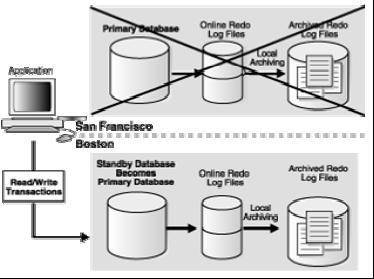
在主库添加一条测试记录后直接将os shutdown模拟灾难
SQL> select * from yallonking;

        ID MYTIME              NAME
---------- ------------------- --------------------
         1 2013/03/30 14:05:39 yallonking

SQL> insert into yallonking values(2,sysdate,'yallonking');

1 row created.

SQL> commit;

Commit complete.

SQL> exit
Disconnected from Oracle Database 10g Enterprise Edition Release 10.2.0.1.0 - Production
With the Partitioning, OLAP and Data Mining options
[oracle@xlong03 ~]$ exit
logout

[root@xlong03 ~]# shutdown -h now

Broadcast message from root (pts/0) (Sat Mar 30 14:41:26 2013):

The system is going down for system halt NOW!
[root@xlong03 ~]#
在物理备库操作
查看备库版本
SQL> select * from gv$version;

   INST_ID BANNER
---------- ----------------------------------------------------------------
         1 Oracle Database 10g Enterprise Edition Release 10.2.0.1.0 - Prod
         1 PL/SQL Release 10.2.0.1.0 - Production
         1 CORE 10.2.0.1.0      Production
         1 TNS for Linux: Version 10.2.0.1.0 - Production
         1 NLSRTL Version 10.2.0.1.0 - Production

SQL> alter database recover managed standby database cancel;

Database altered.

SQL> alter database recover managed standby database finish;
alter database recover managed standby database finish
*
ERROR at line 1:
ORA-00283: recovery session canceled due to errors
ORA-16173: incompatible archival network connections active
注:该处错误是由于在版本10.2上,如果在故障转移过程中,oracle发现还有rfs在活动,则在不加force关键字的情况下会报错。在11g中已经默认使用force关键字了。
SQL> alter database recover managed standby database finish force;

Database altered.

SQL> alter database commit to switchover to primary with session shutdown;

Database altered.

SQL> alter database open;

Database altered.

SQL> alter session set nls_date_format='yyyy/mm/dd hh24:mi:ss';

Session altered.

SQL> select * from yallonking;

        ID MYTIME              NAME
---------- ------------------- --------------------
         1 2013/03/30 14:05:39 yallonking
由于是最大性能模式下运行的,所以有数据丢失。
