A-A+
BBED恢复已删除的行记录
参考文档:disassembling the oracle data block,writter by graham thornton 2005
操作系统信息
[oracle@rhl6 lib]$ uname -a
Linux rhl6.0x64 2.6.32-71.el6.x86_64 #1 SMP Wed Sep 1 01:33:01 EDT 2010 x86_64 x86_64 x86_64 GNU/Linux
数据库版本
SQL> set line 400
SQL> select * from gv$version;

   INST_ID BANNER
---------- --------------------------------------------------------------------------------
         1 Oracle Database 11g Enterprise Edition Release 11.2.0.3.0 - 64bit Production
         1 PL/SQL Release 11.2.0.3.0 - Production
         1 CORE 11.2.0.3.0      Production
         1 TNS for Linux: Version 11.2.0.3.0 - Production
         1 NLSRTL Version 11.2.0.3.0 - Production
测试数据
SQL> sho user
USER is "YALLONKING"
SQL> select rowid,t.* from yallonking t;

ROWID                      ID NAME                 MY_DATE
------------------ ---------- -------------------- -------------------
AAARcnAAFAAAACEAAA          1 yallonking           2013/07/21 11:12:03
AAARcnAAFAAAACEAAB          2 oraking              2013/07/21 11:12:09
AAARcnAAFAAAACEAAC          3 xiaolong             2013/07/21 11:12:17
删除第三行记录,更新第二行记录
SQL> delete from yallonking where id=3;

1 row deleted.

SQL> commit;

Commit complete.

SQL> update yallonking set name='YALLONKING' where id=2;

1 row updated.

SQL> commit;

Commit complete.

SQL> select rowid,t.* from yallonking t;

ROWID                      ID NAME                 MY_DATE
------------------ ---------- -------------------- -------------------
AAARcnAAFAAAACEAAA          1 yallonking           2013/07/21 11:12:03
AAARcnAAFAAAACEAAB          2 YALLONKING           2013/07/21 11:12:09
首先比对下这个表三行记录的row flag值
由于记录很少,所以表上的记录会在一个block上的不同offset
SQL> sho user
USER is "SYS"
SQL> select get_rowid('AAARcnAAFAAAACEAAA') from dual;

GET_ROWID('AAARCNAAFAAAACEAAA')
--------------------------------------------------------------------------------
Row_id type is  :1
Object# is      :71463
Relative_fno is :5
Block number is :132
Row number is   :0
转储指定块
SQL> alter session set tracefile_identifier='wyl';

Session altered.

SQL> alter system checkpoint;

System altered.

SQL> alter system dump datafile 5 block 132;

System altered.
查看转储文件中关于bitmask的值(--H-FL--)
关于bitmask中8位的说明如下图
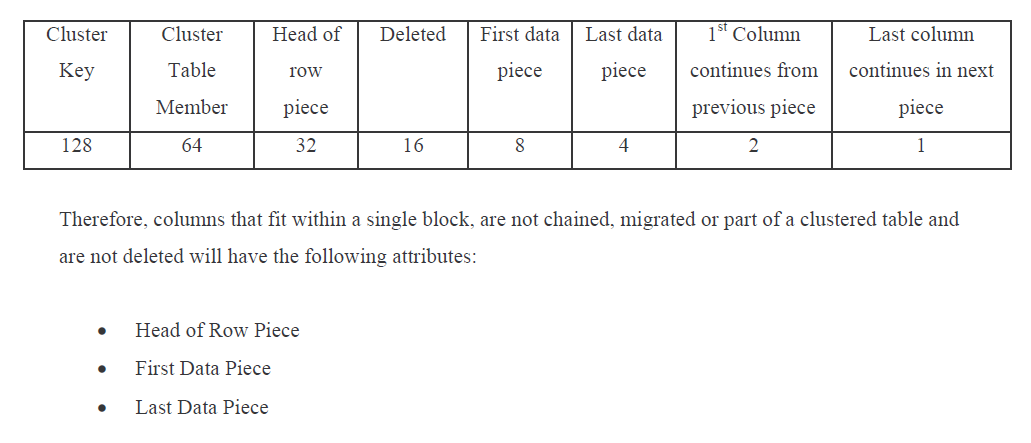
此处发现,更新操作,在bitmask中不会有标注。
[root@rhl6 trace]# pwd
/u01/app/oracle/diag/rdbms/ora11gr2/ora11gr2/trace
[root@rhl6 trace]# grep 'Block header dump' -A 100 ora11gr2_ora_11206_wyl.trc
Block header dump:  0x01400084
 Object id on Block? Y
 seg/obj: 0x11727  csc: 0x00.ba7e9  itc: 2  flg: E  typ: 1 - DATA
     brn: 0  bdba: 0x1400080 ver: 0x01 opc: 0
     inc: 0  exflg: 0

 Itl           Xid                  Uba         Flag  Lck        Scn/Fsc
0x01   0x0002.01d.000002b8  0x00c00715.00b7.14  --U-    1  fsc 0x0000.000bab1a
0x02   0x0005.012.000002b0  0x00c03464.0097.22  --U-    1  fsc 0x0015.000ba7eb
bdba: 0x01400084
data_block_dump,data header at 0x7f539b40ca64
===============
tsiz: 0x1f98
hsiz: 0x18
pbl: 0x7f539b40ca64
     76543210
flag=--------
ntab=1
nrow=3
frre=-1
fsbo=0x18
fseo=0x1f39
avsp=0x1f37
tosp=0x1f4e
0xe:pti[0]      nrow=3  offs=0
0x12:pri[0]     offs=0x1f7f
0x14:pri[1]     offs=0x1f39
0x16:pri[2]     offs=0x1f52
block_row_dump:
tab 0, row 0, @0x1f7f
tl: 25 fb: --H-FL-- lb: 0x0  cc: 3
col  0: [ 2]  c1 02
col  1: [10]  79 61 6c 6c 6f 6e 6b 69 6e 67
col  2: [ 7]  78 71 07 15 0c 0d 04
tab 0, row 1, @0x1f39
tl: 25 fb: --H-FL-- lb: 0x1  cc: 3
col  0: [ 2]  c1 03
col  1: [10]  59 41 4c 4c 4f 4e 4b 49 4e 47
col  2: [ 7]  78 71 07 15 0c 0d 0a
tab 0, row 2, @0x1f52
tl: 2 fb: --HDFL-- lb: 0x2
end_of_block_dump
End dump data blocks tsn: 5 file#: 5 minblk 132 maxblk 132
注:此处可以看到该块中有3行该表的记录,其中第三行(tab 0, row 2)已经被标记为删除(--HDFL--)
使用bbed进行修改
SQL> col file_name for a50
SQL> set line 400
SQL> select FILE_NAME,b.TABLESPACE_NAME from dba_data_files a,dba_tables b where a.TABLESPACE_NAME=b.TABLESPACE_NAME and b.table_name='YALLONKING';

FILE_NAME                                          TABLESPACE_NAME
-------------------------------------------------- ------------------------------
/u01/app/oracle/oradata/ora11gr2/users01.dbf       USERS

BBED> show all
        FILE#           5
        BLOCK#          1
        OFFSET          0
        DBA             0x01400001 (20971521 5,1)
        FILENAME        /u01/app/oracle/oradata/ora11gr2/yallonking01.dbf
        BIFILE          bifile.bbd
        LISTFILE        /home/oracle/bbedfile.lst
        BLOCKSIZE       8192
        MODE            Edit
        EDIT            Unrecoverable
        IBASE           Dec
        OBASE           Dec
        WIDTH           80
        COUNT           512
        LOGFILE         log.bbd
        SPOOL           No

BBED> set dba 5,132
        DBA             0x01400084 (20971652 5,132)

BBED> find /c xiaolong
 File: /u01/app/oracle/oradata/ora11gr2/yallonking01.dbf (5)
 Block: 132              Offsets: 8125 to 8191           Dba:0x01400084
------------------------------------------------------------------------
 7869616f 6c6f6e67 07787107 150c0d12 2c000302 c103076f 72616b69 6e670778
 7107150c 0d0a2c00 0302c102 0a79616c 6c6f6e6b 696e6707 78710715 0c0d0402
 061aab

 <32 bytes per line>

BBED> find /c xiaolong TOP
 File: /u01/app/oracle/oradata/ora11gr2/yallonking01.dbf (5)
 Block: 132              Offsets: 8125 to 8191           Dba:0x01400084
------------------------------------------------------------------------
 7869616f 6c6f6e67 07787107 150c0d12 2c000302 c103076f 72616b69 6e670778
 7107150c 0d0a2c00 0302c102 0a79616c 6c6f6e6b 696e6707 78710715 0c0d0402
 061aab

 <32 bytes per line>
注:top指定从offset 0 开始,curr指定从当前位置开始
此处发现字符xiaolong的offset是8125,我们需要从该位置向前找到行首位置并查看其bitmask的值,也说明我们要找的offset肯定在8125之前
BBED> map /v dba 5,132
 File: /u01/app/oracle/oradata/ora11gr2/yallonking01.dbf (5)
 Block: 132                                   Dba:0x01400084
------------------------------------------------------------
 KTB Data Block (Table/Cluster)

 struct kcbh, 20 bytes                      @0			<<块头结构
    ub1 type_kcbh                           @0			<<块类型
    ub1 frmt_kcbh                           @1			<<块格式(1为oracle 7,2为oracle 8+)
    ub1 spare1_kcbh                         @2
    ub1 spare2_kcbh                         @3
    ub4 rdba_kcbh                           @4       	<<相关的数据块地址
    ub4 bas_kcbh                            @8       	<<SCN base
    ub2 wrp_kcbh                            @12      	<<SCN Wrap
    ub1 seq_kcbh                            @14      	<<序列号
    ub1 flg_kcbh                            @15
    ub2 chkval_kcbh                         @16
    ub2 spare3_kcbh                         @18

 struct ktbbh, 72 bytes                     @20
    ub1 ktbbhtyp                            @20
    union ktbbhsid, 4 bytes                 @24
    struct ktbbhcsc, 8 bytes                @28
    sb2 ktbbhict                            @36
    ub1 ktbbhflg                            @38
    ub1 ktbbhfsl                            @39
    ub4 ktbbhfnx                            @40
    struct ktbbhitl[2], 48 bytes            @44

 struct kdbh, 14 bytes                      @100
    ub1 kdbhflag                            @100
    sb1 kdbhntab                            @101
    sb2 kdbhnrow                            @102
    sb2 kdbhfrre                            @104
    sb2 kdbhfsbo                            @106
    sb2 kdbhfseo                            @108
    sb2 kdbhavsp                            @110
    sb2 kdbhtosp                            @112

 struct kdbt[1], 4 bytes                    @114
    sb2 kdbtoffs                            @114
    sb2 kdbtnrow                            @116

 sb2 kdbr[3]                                @118			<<行目录

 ub1 freespace[7969]                        @124			<<空闲空间

 ub1 rowdata[95]                            @8093    		<<行数据

 ub4 tailchk                                @8188
查看表中3行记录的bitmask值并记录他们的offset值
BBED> p *kdbr[0]			<<第一行记录
rowdata[70]
-----------
ub1 rowdata[70]                             @8163     0x2c

BBED> p *kdbr[1]			<<第二行记录
rowdata[0]
----------
ub1 rowdata[0]                              @8093     0x2c

BBED> p *kdbr[2]			<<第三行记录,此处的2可以从之前的trace中标记为'--HDFL--'处获得
rowdata[25]
-----------
ub1 rowdata[25]                             @8118     0x3c
注意:前2行记录都是0x2c(十进制的2*16+12=44= --H-FL-- =0+0+32+0+8+4+0+0=44)
第三行记录是0x3c(十进制的3*16+12=60= --HDFL-- =0+0+32+16+8+4+0+0=60)
所以,我们在这里只需要将第三行的bitmask从0x3c改为0x2c,也就是将之前的trace中的‘--HDFL--’ 改为 ‘--H-FL--’即可,也就是把60变为44即可。
上边我们已找到了需要修改的offset位置了,下边进行修改即可。
BBED> dump /v dba 5,132 offset 8118
 File: /u01/app/oracle/oradata/ora11gr2/yallonking01.dbf (5)
 Block: 132     Offsets: 8118 to 8191  Dba:0x01400084
-------------------------------------------------------
 3c020302 c1040878 69616f6c 6f6e6707 l <...á..xiaolong.
 78710715 0c0d122c 000302c1 03076f72 l xq.....,...á..or
 616b696e 67077871 07150c0d 0a2c0003 l aking.xq.....,..
 02c1020a 79616c6c 6f6e6b69 6e670778 l .á..yallonking.x
 7107150c 0d040206 1aab              l q........?

 <16 bytes per line>

BBED> modify /x 2c dba 5,132 offset 8118    <</x是指修改类型为16进制
 File: /u01/app/oracle/oradata/ora11gr2/yallonking01.dbf (5)
 Block: 132              Offsets: 8118 to 8191           Dba:0x01400084
------------------------------------------------------------------------
 2c020302 c1040878 69616f6c 6f6e6707 78710715 0c0d122c 000302c1 03076f72
 616b696e 67077871 07150c0d 0a2c0003 02c1020a 79616c6c 6f6e6b69 6e670778
 7107150c 0d040206 1aab

 <32 bytes per line>

BBED> dump /v dba 5,132 offset 8118
 File: /u01/app/oracle/oradata/ora11gr2/yallonking01.dbf (5)
 Block: 132     Offsets: 8118 to 8191  Dba:0x01400084
-------------------------------------------------------
 2c020302 c1040878 69616f6c 6f6e6707 l ,...á..xiaolong.
 78710715 0c0d122c 000302c1 03076f72 l xq.....,...á..or
 616b696e 67077871 07150c0d 0a2c0003 l aking.xq.....,..
 02c1020a 79616c6c 6f6e6b69 6e670778 l .á..yallonking.x
 7107150c 0d040206 1aab              l q........?

 <16 bytes per line>
注意:上边的修改中,我们可以看出已经将3c改为了2c
下边返回到数据库查看恢复的记录。
SQL> alter system flush BUFFER_CACHE;

System altered.

SQL> select rowid,t.* from yallonking t;

ROWID                      ID NAME                 MY_DATE
------------------ ---------- -------------------- -------------------
AAARcnAAFAAAACEAAA          1 yallonking           2013/07/21 11:12:03
AAARcnAAFAAAACEAAB          2 YALLONKING           2013/07/21 11:12:09
AAARcnAAFAAAACEAAC          3 xiaolong             2013/07/21 11:12:17
至此ok!
