oracle database 12c在redhat6.2×64上的安装
众所周知,oracle在6月底(我记得是25号吧)发布了他们的新的dbms版本12c,至今也不到1月左右,之前一直没有时间去下载介质,昨晚等到22:00之后才下的安装介质(其他时间段公司封网,你懂得...)。今天便安装了一下,感觉和之前的版本在安装上除了一个PDB的新特性之外,没有什么特别的地方。下边便是俺的安装过程,对了,期间为了安装成功,重装了虚机,后边建db的时候,虚机磁盘空间不足,又扩了一次虚机的磁盘。
======================================================================================================================
主机存储要求
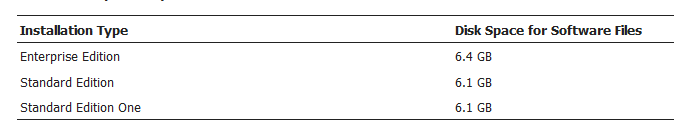

查看OS信息
[root@ora12cr1 ~]# uname -a
Linux ora12cr1 2.6.32-220.el6.x86_64 #1 SMP Wed Nov 9 08:03:13 EST 2011 x86_64 x86_64 x86_64 GNU/Linux
[root@ora12cr1 ~]# cat /etc/redhat-release
Red Hat Enterprise Linux Server release 6.2 (Santiago)
[root@ora12cr1 ~]# df -h
Filesystem            Size  Used Avail Use% Mounted on
/dev/sda3              16G  3.1G   12G  21% /
tmpfs                1004M     0 1004M   0% /dev/shm
/dev/sda1             388M   33M  336M   9% /boot
[root@ora12cr1 ~]# free -m
             total       used       free     shared    buffers     cached
Mem:          2006        205       1801          0         18        102
-/+ buffers/cache:         84       1922
Swap:         4095          0       4095
创建用户和组
[root@ora12cr1 ~]# groupadd oinstall
[root@ora12cr1 ~]# groupadd dba
[root@ora12cr1 ~]# useradd -g oinstall -G dba oracle
[root@ora12cr1 ~]# passwd oracle
Changing password for user oracle.
New password:
BAD PASSWORD: it is based on a dictionary word
BAD PASSWORD: is too simple
Retype new password:
passwd: all authentication tokens updated successfully.
创建目录
[root@ora12cr1 ~]# mkdir -p /u01/app/oracle
[root@ora12cr1 ~]# chown -R oracle:oinstall /u01/
[root@ora12cr1 ~]# chmod -R 755 /u01
主机配置信息
[root@ora12cr1 ~]# cat /etc/hosts
127.0.0.1   localhost localhost.localdomain localhost4 localhost4.localdomain4
::1         localhost localhost.localdomain localhost6 localhost6.localdomain6

192.168.137.210 ora12cr1
[root@ora12cr1 ~]# cat /etc/sysctl.conf         <<末尾添加以下参数

#for oracle 12cr1
fs.aio-max-nr = 1048576
fs.file-max = 6815744
kernel.shmall = 2097152
kernel.shmmax = 536870912
kernel.shmmni = 4096
kernel.sem = 250 32000 100 128
net.ipv4.ip_local_port_range = 9000 65500
net.core.rmem_default = 262144
net.core.rmem_max = 4194304
net.core.wmem_default = 262144
net.core.wmem_max = 1048586

[root@ora12cr1 ~]# /sbin/sysctl -p

[root@ora12cr1 ~]# cat /etc/security/limits.conf    <<末尾添加以下参数

#for oracle 12cr1
oracle              soft    nproc   2047
oracle              hard    nproc   16384
oracle              soft    nofile  1024
oracle              hard    nofile  65536
oracle              soft    stack   10240
配置oracle用户环境变量
[root@ora12cr1 ~]# su - oracle
[oracle@ora12cr1 ~]$ cat .bash_profile    <<末尾添加以下参数
#oracle sets
TMP=/tmp; export TMP
TMPDIR=$TMP; export TMPDIR

ORACLE_BASE=/u01/app/oracle; export ORACLE_BASE
ORACLE_HOME=$ORACLE_BASE/product/12.1.0/db_1; export ORACLE_HOME
ORACLE_SID=ora12cr1; export ORACLE_SID
PATH=$ORACLE_HOME/bin:$PATH; export PATH
DISPLAY=192.168.137.1:0.0; export DISPLAY

#alias sqlplus="rlwrap sqlplus"
#alias rman="rlwrap rman"

if [ $USER = "oracle" ]; then
        if [ $SHELL = "/bin/ksh" ]; then
              ulimit -p 16384
              ulimit -n 65536
        else
              ulimit -u 16384 -n 65536
        fi
fi
装软件
[oracle@ora12cr1 database]$ ./runInstaller
Starting Oracle Universal Installer...

Checking Temp space: must be greater than 500 MB.   Actual 9149 MB    Passed
Checking swap space: must be greater than 150 MB.   Actual 4095 MB    Passed
Checking monitor: must be configured to display at least 256 colors.    Actual 16777216    Passed
Preparing to launch Oracle Universal Installer from /tmp/OraInstall2013-07-12_09-57-00AM. Please wait …

中间省略部分步骤
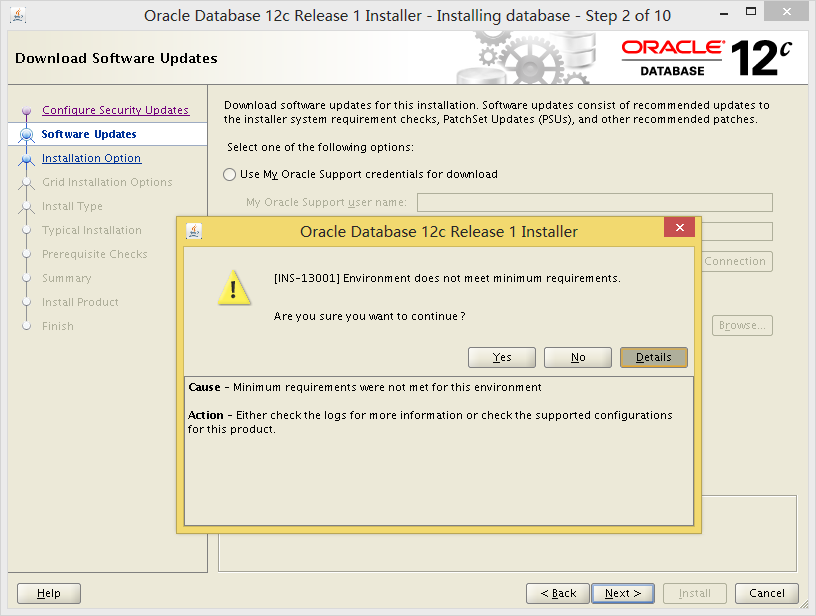
此处发现报以上错误,忽略并重新执行
[oracle@ora12cr1 database]$ ./runInstaller -ignorePrereq
再次安装,还是不顺,遇到以下奇怪的问题
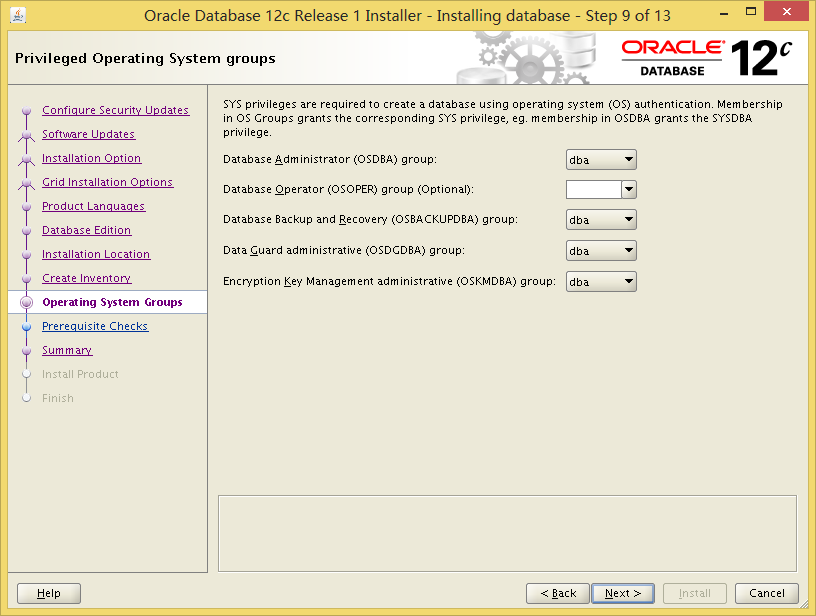
此处发现直接跳过了Prerequisite Checks这一步
继续下一步安装吧,估计到时候在83%左右的link二进制文件的的时候肯定会报很多各种错误,具体问题具体处理吧。
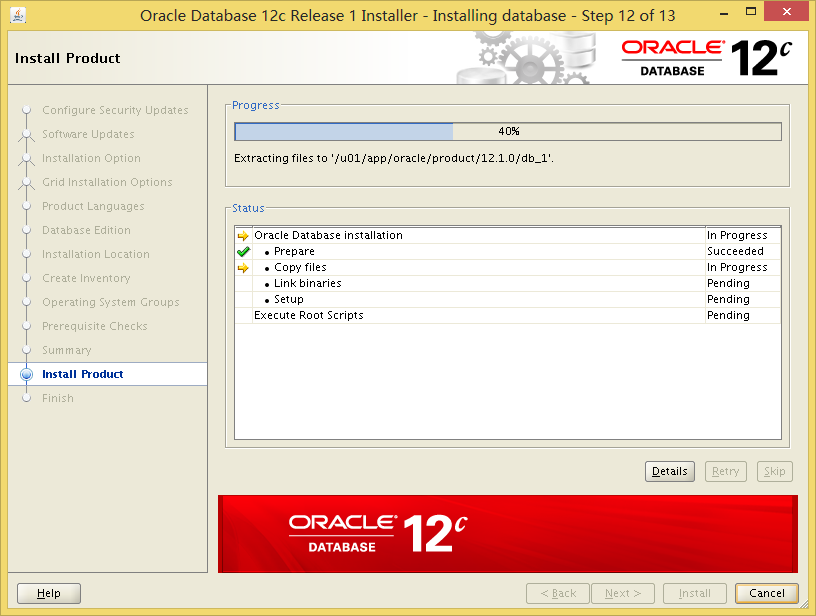
果然,报错如下:
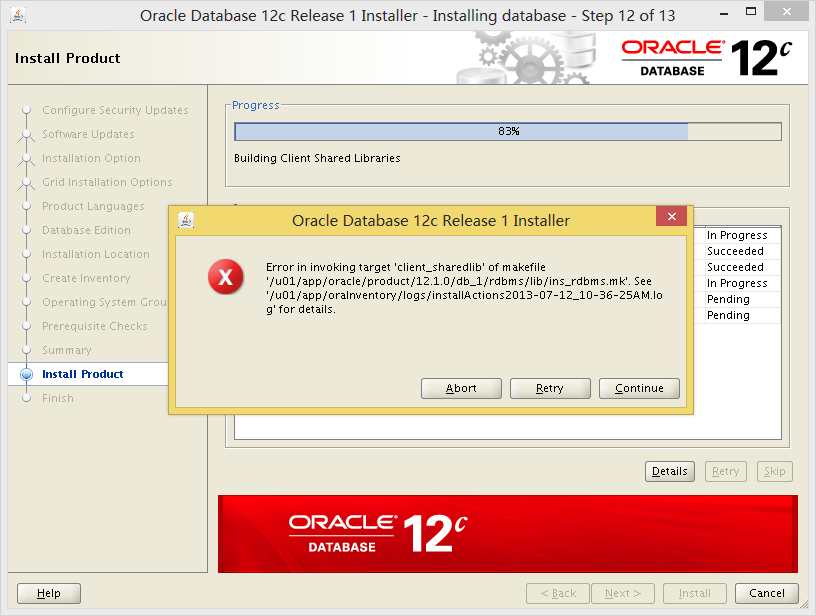
根据日志报错,安装缺失的rpm包
[root@ora12cr1 Packages]# yum install gcc-4.4.6-3.el6.x86_64.rpm
Loaded plugins: product-id, security, subscription-manager
Updating certificate-based repositories.
rhel-localrepos                                                                                              | 4.0 kB     00:00 ...
rhel-localrepos/primary_db                                                                                   | 3.1 MB     00:00 ...
Setting up Install Process
Examining gcc-4.4.6-3.el6.x86_64.rpm: gcc-4.4.6-3.el6.x86_64
Marking gcc-4.4.6-3.el6.x86_64.rpm to be installed
Resolving Dependencies
--> Running transaction check
---> Package gcc.x86_64 0:4.4.6-3.el6 will be installed
--> Processing Dependency: cpp = 4.4.6-3.el6 for package: gcc-4.4.6-3.el6.x86_64
--> Processing Dependency: cloog-ppl >= 0.15 for package: gcc-4.4.6-3.el6.x86_64
--> Processing Dependency: glibc-devel >= 2.2.90-12 for package: gcc-4.4.6-3.el6.x86_64
--> Running transaction check
---> Package cloog-ppl.x86_64 0:0.15.7-1.2.el6 will be installed
--> Processing Dependency: libppl.so.7()(64bit) for package: cloog-ppl-0.15.7-1.2.el6.x86_64
--> Processing Dependency: libppl_c.so.2()(64bit) for package: cloog-ppl-0.15.7-1.2.el6.x86_64
---> Package cpp.x86_64 0:4.4.6-3.el6 will be installed
--> Processing Dependency: libmpfr.so.1()(64bit) for package: cpp-4.4.6-3.el6.x86_64
---> Package glibc-devel.x86_64 0:2.12-1.47.el6 will be installed
--> Processing Dependency: glibc-headers = 2.12-1.47.el6 for package: glibc-devel-2.12-1.47.el6.x86_64
--> Processing Dependency: glibc-headers for package: glibc-devel-2.12-1.47.el6.x86_64
--> Running transaction check
---> Package glibc-headers.x86_64 0:2.12-1.47.el6 will be installed
--> Processing Dependency: kernel-headers >= 2.2.1 for package: glibc-headers-2.12-1.47.el6.x86_64
--> Processing Dependency: kernel-headers for package: glibc-headers-2.12-1.47.el6.x86_64
---> Package mpfr.x86_64 0:2.4.1-6.el6 will be installed
---> Package ppl.x86_64 0:0.10.2-11.el6 will be installed
--> Running transaction check
---> Package kernel-headers.x86_64 0:2.6.32-220.el6 will be installed
--> Finished Dependency Resolution

Dependencies Resolved

====================================================================================================================================
 Package                        Arch                   Version                        Repository                               Size
====================================================================================================================================
Installing:
 gcc                            x86_64                 4.4.6-3.el6                    /gcc-4.4.6-3.el6.x86_64                  18 M
Installing for dependencies:
 cloog-ppl                      x86_64                 0.15.7-1.2.el6                 rhel-localrepos                          93 k
 cpp                            x86_64                 4.4.6-3.el6                    rhel-localrepos                         3.7 M
 glibc-devel                    x86_64                 2.12-1.47.el6                  rhel-localrepos                         966 k
 glibc-headers                  x86_64                 2.12-1.47.el6                  rhel-localrepos                         596 k
 kernel-headers                 x86_64                 2.6.32-220.el6                 rhel-localrepos                         1.6 M
 mpfr                           x86_64                 2.4.1-6.el6                    rhel-localrepos                         156 k
 ppl                            x86_64                 0.10.2-11.el6                  rhel-localrepos                         1.3 M

Transaction Summary
====================================================================================================================================
Install       8 Package(s)

Total size: 27 M
Total download size: 8.4 M
Installed size: 38 M
Is this ok [y/N]: y
Downloading Packages:
------------------------------------------------------------------------------------------------------------------------------------
Total                                                                                                25 MB/s | 8.4 MB     00:00
warning: rpmts_HdrFromFdno: Header V3 RSA/SHA256 Signature, key ID fd431d51: NOKEY
Retrieving key from file:///etc/pki/rpm-gpg/RPM-GPG-KEY-redhat-release
Importing GPG key 0xFD431D51:
 Userid : Red Hat, Inc. (release key 2) <security@redhat.com>
 Package: redhat-release-server-6Server-6.2.0.3.el6.x86_64 (@anaconda-RedHatEnterpriseLinux-201111171049.x86_64/6.2)
 From   : /etc/pki/rpm-gpg/RPM-GPG-KEY-redhat-release
Is this ok [y/N]: y
Importing GPG key 0x2FA658E0:
 Userid : Red Hat, Inc. (auxiliary key) <security@redhat.com>
 Package: redhat-release-server-6Server-6.2.0.3.el6.x86_64 (@anaconda-RedHatEnterpriseLinux-201111171049.x86_64/6.2)
 From   : /etc/pki/rpm-gpg/RPM-GPG-KEY-redhat-release
Is this ok [y/N]: y
Running rpm_check_debug
Running Transaction Test
Transaction Test Succeeded
Running Transaction
  Installing : ppl-0.10.2-11.el6.x86_64                                                                                         1/8
  Installing : cloog-ppl-0.15.7-1.2.el6.x86_64                                                                                  2/8
  Installing : mpfr-2.4.1-6.el6.x86_64                                                                                          3/8
  Installing : cpp-4.4.6-3.el6.x86_64                                                                                           4/8
  Installing : kernel-headers-2.6.32-220.el6.x86_64                                                                             5/8
  Installing : glibc-headers-2.12-1.47.el6.x86_64                                                                               6/8
  Installing : glibc-devel-2.12-1.47.el6.x86_64                                                                                 7/8
  Installing : gcc-4.4.6-3.el6.x86_64                                                                                           8/8
rhel-localrepos/productid                                                                                    | 1.7 kB     00:00 ...
Installed products updated.

Installed:
  gcc.x86_64 0:4.4.6-3.el6

Dependency Installed:
  cloog-ppl.x86_64 0:0.15.7-1.2.el6          cpp.x86_64 0:4.4.6-3.el6                     glibc-devel.x86_64 0:2.12-1.47.el6
  glibc-headers.x86_64 0:2.12-1.47.el6       kernel-headers.x86_64 0:2.6.32-220.el6       mpfr.x86_64 0:2.4.1-6.el6
  ppl.x86_64 0:0.10.2-11.el6

Complete!
安装完后,retry继续即可!
终于看到root的scripts了
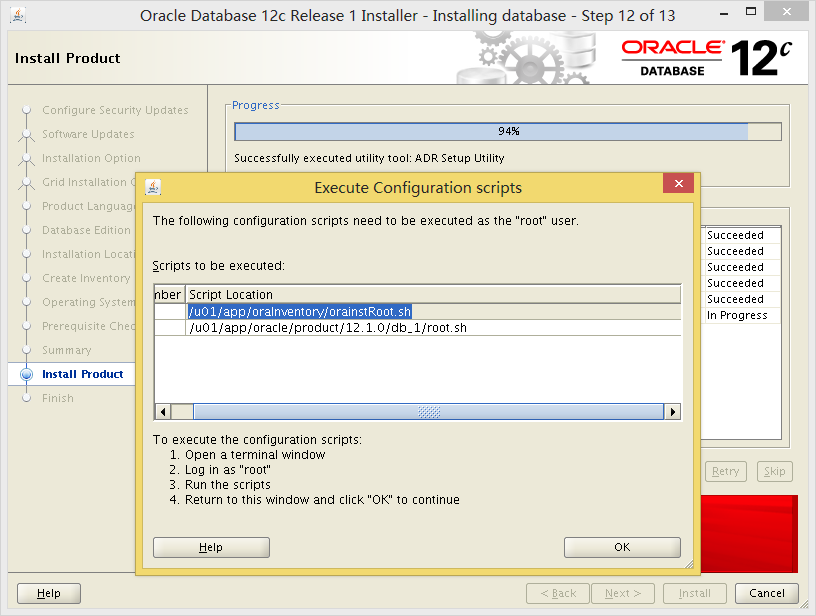
[root@ora12cr1 ~]# /u01/app/oraInventory/orainstRoot.sh
Changing permissions of /u01/app/oraInventory.
Adding read,write permissions for group.
Removing read,write,execute permissions for world.

Changing groupname of /u01/app/oraInventory to oinstall.
The execution of the script is complete.
[root@ora12cr1 ~]# /u01/app/oracle/product/12.1.0/db_1/root.sh
Performing root user operation for Oracle 12c

The following environment variables are set as:
    ORACLE_OWNER= oracle
    ORACLE_HOME=  /u01/app/oracle/product/12.1.0/db_1

Enter the full pathname of the local bin directory: [/usr/local/bin]:
   Copying dbhome to /usr/local/bin ...
   Copying oraenv to /usr/local/bin ...
   Copying coraenv to /usr/local/bin ...


Creating /etc/oratab file...
Entries will be added to the /etc/oratab file as needed by
Database Configuration Assistant when a database is created
Finished running generic part of root script.
Now product-specific root actions will be performed.
使用netca配置listener(和之前的版本没有什么两样,此处略过)
下边继续用dbca创建数据库(此处有个新特性-pdb)
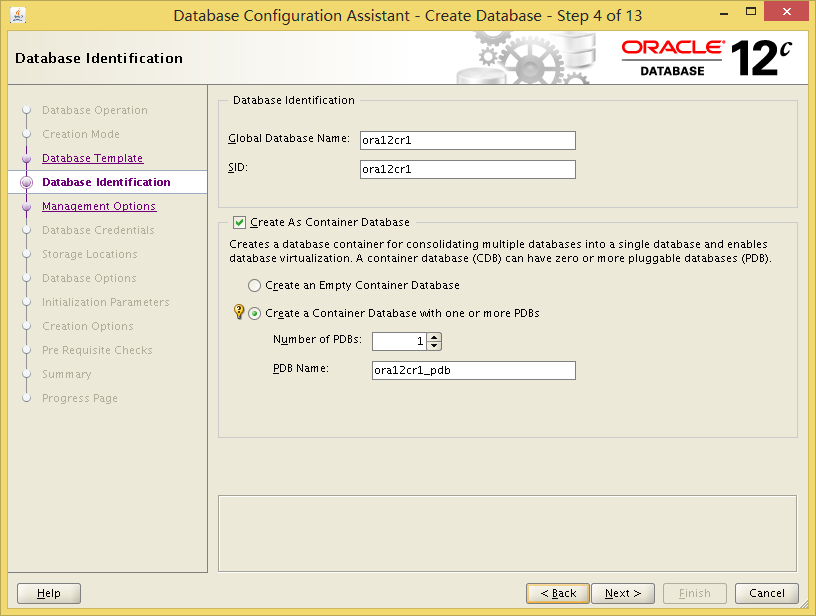
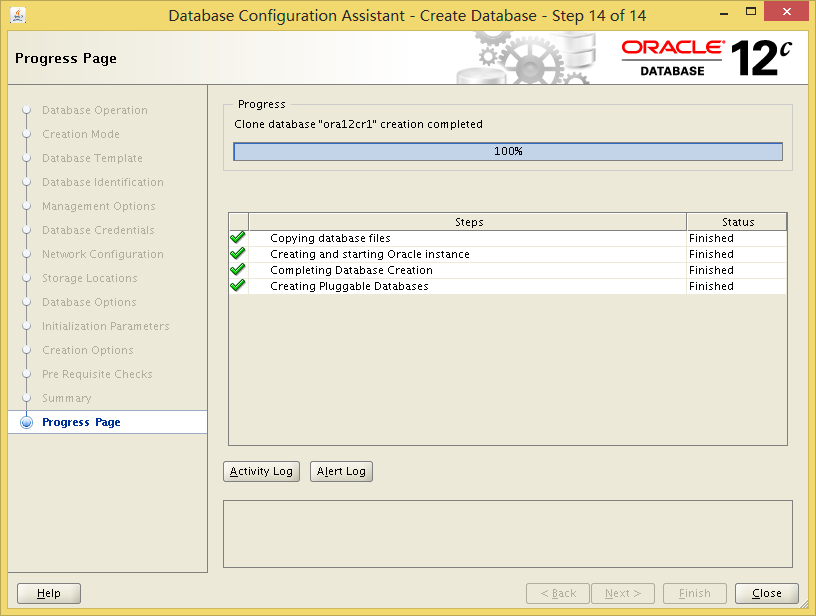
下边继续装db
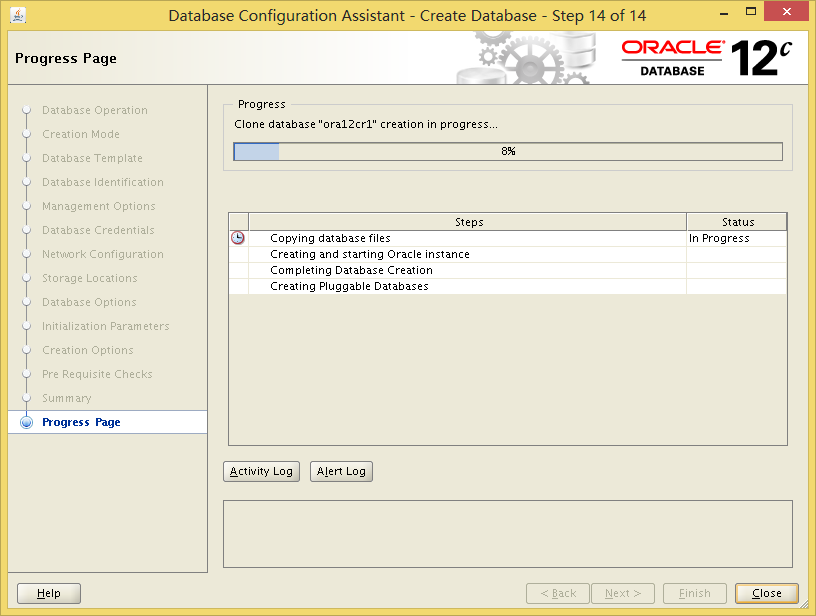
好了,可以午休去了,40mins后估计就ok!
下边来让我们看看新的12c的进程有哪些,估计又会有很多吧...
[oracle@ora12cr1 ~]$ ps -ef | grep ora_| grep -v grep;ps -ef | grep ora_ | grep -v grep| wc -l
oracle    3323     1  0 12:26 ?        00:00:00 ora_pmon_ora12cr1
oracle    3325     1  0 12:26 ?        00:00:00 ora_psp0_ora12cr1
oracle    3327     1  0 12:26 ?        00:00:00 ora_vktm_ora12cr1
oracle    3331     1  0 12:26 ?        00:00:00 ora_gen0_ora12cr1
oracle    3333     1  0 12:26 ?        00:00:00 ora_mman_ora12cr1
oracle    3337     1  0 12:26 ?        00:00:00 ora_diag_ora12cr1
oracle    3339     1  0 12:26 ?        00:00:00 ora_dbrm_ora12cr1
oracle    3341     1  0 12:26 ?        00:00:00 ora_dia0_ora12cr1
oracle    3343     1  0 12:26 ?        00:00:00 ora_dbw0_ora12cr1
oracle    3345     1  0 12:26 ?        00:00:00 ora_lgwr_ora12cr1
oracle    3347     1  0 12:26 ?        00:00:00 ora_ckpt_ora12cr1
oracle    3349     1  0 12:26 ?        00:00:00 ora_smon_ora12cr1
oracle    3351     1  0 12:26 ?        00:00:00 ora_reco_ora12cr1
oracle    3353     1  0 12:26 ?        00:00:00 ora_lreg_ora12cr1
oracle    3355     1  0 12:26 ?        00:00:02 ora_mmon_ora12cr1
oracle    3357     1  0 12:26 ?        00:00:00 ora_mmnl_ora12cr1
oracle    3359     1  0 12:26 ?        00:00:00 ora_d000_ora12cr1
oracle    3361     1  0 12:26 ?        00:00:00 ora_s000_ora12cr1
oracle    3373     1  0 12:26 ?        00:00:00 ora_tmon_ora12cr1
oracle    3375     1  0 12:26 ?        00:00:00 ora_tt00_ora12cr1
oracle    3377     1  0 12:26 ?        00:00:00 ora_smco_ora12cr1
oracle    3379     1  0 12:26 ?        00:00:01 ora_w000_ora12cr1
oracle    3381     1  0 12:26 ?        00:00:00 ora_aqpc_ora12cr1
oracle    3385     1  0 12:26 ?        00:00:04 ora_p000_ora12cr1
oracle    3387     1  0 12:26 ?        00:00:06 ora_p001_ora12cr1
oracle    3389     1  0 12:26 ?        00:00:00 ora_p002_ora12cr1
oracle    3391     1  0 12:26 ?        00:00:01 ora_p003_ora12cr1
oracle    3421     1  0 12:26 ?        00:00:04 ora_cjq0_ora12cr1
oracle    3425     1  0 12:26 ?        00:00:00 ora_qm02_ora12cr1
oracle    3429     1  0 12:26 ?        00:00:00 ora_q002_ora12cr1
oracle    3431     1  0 12:26 ?        00:00:00 ora_q003_ora12cr1
oracle    3435     1  0 12:26 ?        00:00:01 ora_p004_ora12cr1
oracle    3437     1  0 12:26 ?        00:00:01 ora_p005_ora12cr1
oracle    3784     1  0 12:36 ?        00:00:00 ora_w001_ora12cr1
34

SQL> set line 400
SQL> select BANNER from v$version;

BANNER
--------------------------------------------------------------------------------
Oracle Database 12c Enterprise Edition Release 12.1.0.1.0 - 64bit Production
PL/SQL Release 12.1.0.1.0 - Production
CORE    12.1.0.1.0      Production
TNS for Linux: Version 12.1.0.1.0 - Production
NLSRTL Version 12.1.0.1.0 - Production

SQL> select DBID,NAME,to_char(CREATED,'yyyy/mm/dd hh24:mi:ss'),open_mode from v$database;

      DBID NAME      TO_CHAR(CREATED,'YY OPEN_MODE
---------- --------- ------------------- --------------------
1282084249 ORA12CR1  2013/07/12 11:45:29 READ WRITE
至此,全部OK
